Amazon Pay V2
1. About Amazon Pay
1.1 General information about Amazon Pay
Amazon Pay is a fast, secure, and trusted payment solution that allows buyers to use their Amazon credentials to make purchases on your website. By integrating Amazon Pay, you can offer a seamless checkout experience and increase conversion rates.
Customer journey
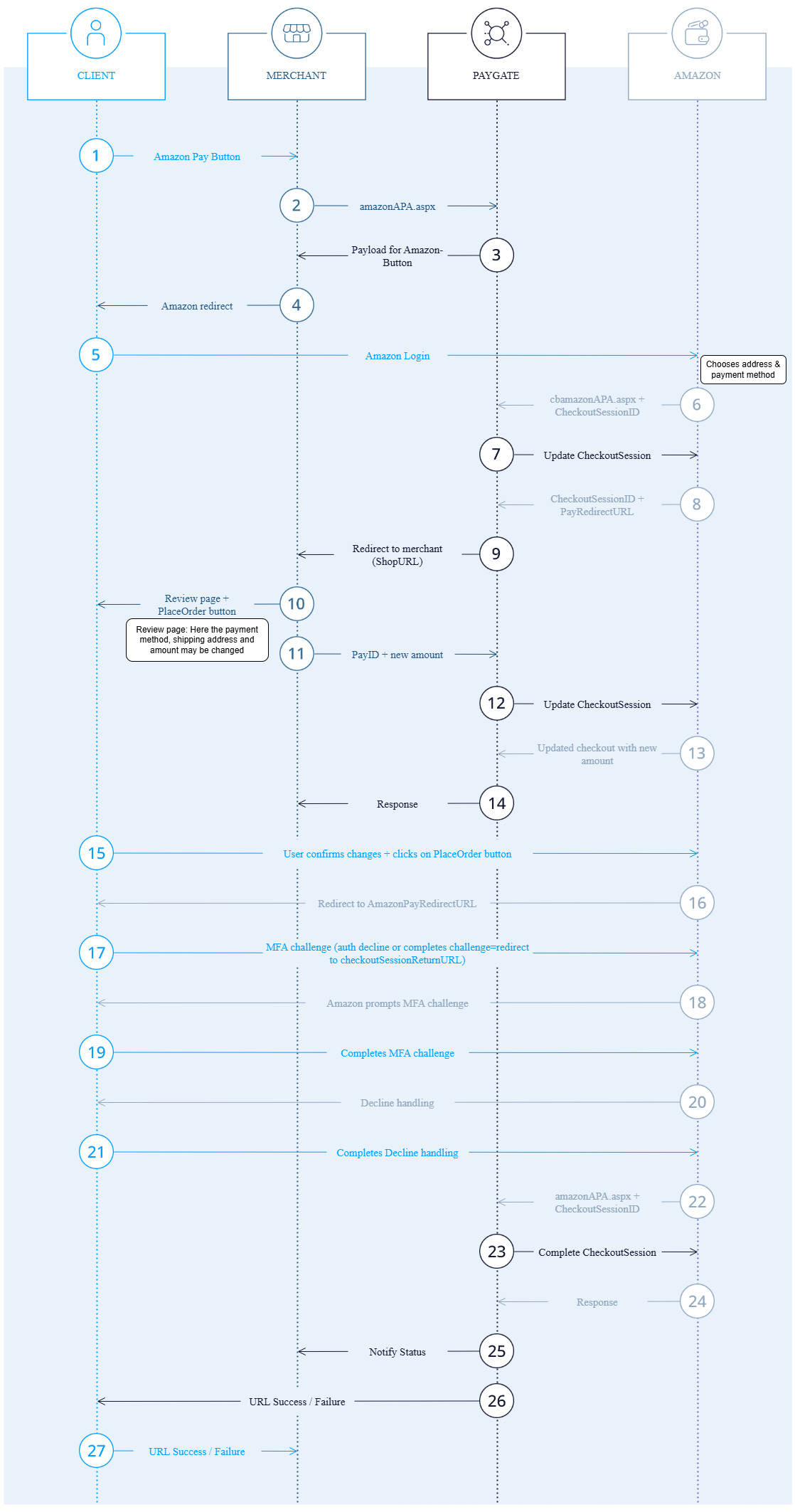
- Product Selection & Checkout: Buyer adds products to their cart and proceeds to checkout by selecting the Amazon Pay button.
- Amazon Login & Credentials Selection: Buyer is redirected to Amazon’s login page to sign in to their Amazon account. After login, buyer selects their preferred payment method and shipping address.
- Review Order: The buyer is redirected back to your website to review their order details with a possibility to change the details if needed.
- Place Order: Buyer confirms the purchase by clicking „Place order“. Buyer is redirected to Amazon for additional authentication that may be needed. Once successful, the transaction is authorized.
- Order confirmation: Buyer is redirected back to your order confirmation page.
1.2 Process flow chart
2. Accept Amazon Pay
Follow the below steps in order to start accepting Amazon Pay.

Notice: If you are already integrated with 1cs Online Payment System for Amazon Pay V1, you can skip Step 1 and proceed directly to Step 2.
Step 1: Register for Amazon Pay
- Register yourself at https://pay.amazon.com/signup.
- You can switch the country on the sign-up page, as per your business location.
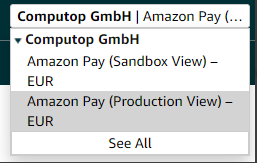
- After a successful login, you can set up both sandbox and production environments on your Amazon Pay account, by switching between the two.
Step 2: Obtain MWS Autorization Token
MWS Authorization token is a secret token that enables 1cs Online Payment System to connect to Amazon on behalf of your store. It is important to generate this token and share it with 1cs Support during your onboarding process.
Steps to generate MWS Authorization token
- Navigate to settings and select User Permissions.
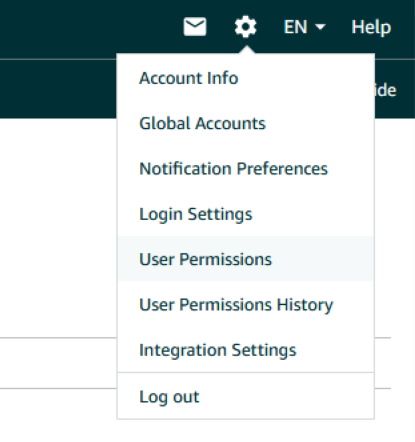
2. On the User Permissions page navigate to the section „Third-party developer and apps“ and click „Visit Manage your apps“.

3. On the Manage Your Apps page, click the action „Authorize new developer“.
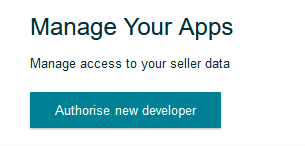
4. Provide Developer’s Name and Developer ID. Below credentials are same for Sandbox and Production environment setup.
a) Developer Name: CT_Sandbox_EU
b) Developer ID: 0143-6461-8727
5. Provide your consent in the next page. Upon completion, the MWS Authorization token will be generated. You can also view it later in the „Manage your Apps“ page.

Step3: Setup Notify URL
Notify URL is used by Amazon for asynchronous responses to 1cs Online Payment System for operations like capture and refunds. You need to setup 1cs Online Payment Systems notify URL for your store on Amazon Seller Central account for these notifications to be received.
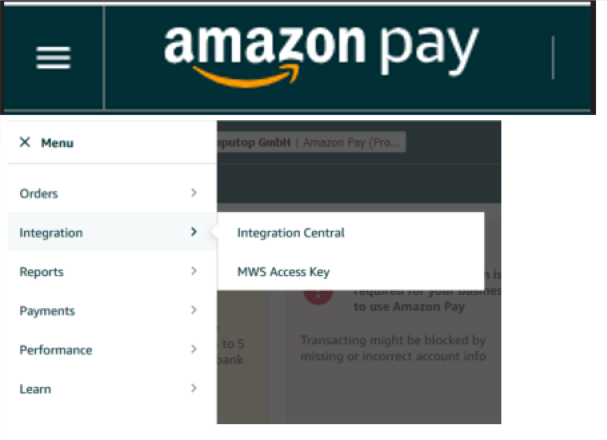
- Navigate to Hamburger menu on the left and select Integration → Integration Central.
2. Find the option IPN settings at the bottom of the page.
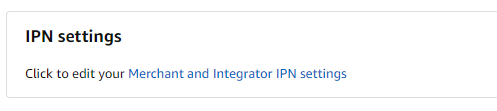
3. Click on the link „Merchant and Integrator IPN settings“. On the page, update the field „Integrator URL“ to https://www.computop-paygate.com/amazonAPAV2Notify.aspx?mid=yourmerchantId®ion=EU.
Notice: Replace your merchantId with the merchantId setup in 1cs Online Payment System.

Step 4: Onboarding with First Cash Solution for Amazon Pay
In order to onboard with First Cash Solution for Amazon Pay, provide the following information. Note that the below information is needed for every market you have your presence.
- Country code – Country code of the market.
- Merchant ID – Merchant ID from your Amazon Seller Central Account.
- MWS Authorization Token – Generated in Step 2.
- Store Name – Name of the store.
Step 5: Render Amazon Pay Button
Render Amazon Pay Button on your checkout page. Use the below code snippet as a reference.
<body>
<!-- This is the container where the Amazon Pay button will be rendered -->
<div id="AmazonPayButton"></div>
<!-- This script loads the Amazon Pay JavaScript SDK from Amazon's servers -->
<script src="https://static-eu.payments-amazon.com/checkout.js"></script>
<script type="text/javascript" charset="utf-8">
// Render the Amazon Pay button within the 'AmazonPayButton' div.
const amazonPayButton = amazon.Pay.renderButton('#AmazonPayButton', {
merchantId: 'merchant_id',
publicKeyId: 'SANDBOX-xxxxxxxxxx',
ledgerCurrency: 'EUR',
checkoutLanguage: 'en_GB',
productType: 'PayAndShip',
placement: 'Cart',
buttonColor: 'Gold',
estimatedOrderAmount: { "amount": "109.99", "currencyCode": "EUR" }
});
// Event listener for when the Amazon Pay button is clicked
amazonPayButton.onClick(function(){
// Replace <<call_to_your_backend_function>> with your actual function
// that makes a server-side call to your backend, which in turn communicates
// with Paygate to get the 'payload', 'signature', and 'publicKeyId'
const [payload, signature, publicKeyId] = <<call_to_your_backend_function>>();
// Initialize the Amazon Pay checkout session with the fetched data above
amazonPayButton.initCheckout({
createCheckoutSessionConfig: {
payloadJSON: payload,
signature: signature,
publicKeyId: publicKeyId
}
});
});
</script>
</body>
Use the below table as a reference for button parameters that can be passed to render the button as per your need.
| Button Parameters | CND | Description | Permissible Values |
| publicKeyId | M | Key provided by Amazon | |
| placement | M | Placement of the button | Permissible values: Cart |
| merchantId | M | SellerId issued by Amazon | |
| buttonColor | O | The parameter buttonColor defines the color of the button | Permissible values: Gold, LightGray, DarkGray Default value ‚Gold‘ |
| checkoutLanguage | O | The parameter checkoutLanguage is optionally used for defining the language of the checkout process. This is helpful especially within a multilingual shop environment. Without submitting the parameter Language Amazon automatically uses the most suitable language for checkout. | Permissible values: • EU/UK-merchants – ‚en_GB‘, de_DE‘, ‚fr_FR‘, ‚it_IT‘, ‚es_ES‘ |
| productType | O | The parameter productType defines if the transaction is done for physical or digital goods. PayAndShip is default. | Permissible values: • PayAndShip – physical goods • PayOnly – digital goods |
| ledgerCurrency | M | Your ledger currency. For EU accounts a different presentment currency can be used on the auth/capture. | Permissible values: • EU-merchants – ‚EUR‘ |
3. 1cs OPS interface
3.1 Definitions
3.1.1 Data formats
| Format | Description |
| a | alphabetical |
| as | alphabetical with special characters |
| n | numeric |
| an | alphanumeric |
| ans | alphanumeric with special characters |
| ns | numeric with special characters |
| bool | boolean expression (true or false) |
| 3 | fixed length with 3 digits/characters |
| ..3 | variable length with maximum 3 digits/characters |
| enum | enumeration of allowed values |
| dttm | ISODateTime (JJJJ-MM-TTThh:mm:ss) |
3.1.2 Abbreviations
| Format | Description | Comment |
| CND | condition | |
| M | mandatory | If a parameter is mandatory, then it must be present |
| O | optional | If a parameter is optional, then it can be present, but it is not required |
| C | conditional | If a parameter is conditional, then there is a conditional rule which specifies whether it is mandatory or optional |
Notice: Please note that the names of parameters can be returned in upper or lower case.
Step 6: Integrate to 1cs OPS interface
Integrate your backend with 1cs OPS interface to fetch the payload to be able to initialize the checkout session with Amazon. In order to initialize a payment with Amazon Pay, please use the following URL:
https://www.computop-paygate.com/amazonAPA.aspx
Notice: For security reasons, 1cs Online Payment System rejects all payment requests with formatting errors. Therefore, please use the correct data type for each parameter.
The following table describes the encrypted payment request parameters:
| Parameter | Format | CND | Description |
| MerchantID | ans..30 | M | MerchantID, assigned by First Cash Solution. Additionally this parameter has to be passed in plain language too. |
| TransID | ans..64 | M | TransactionID provided by you which should be unique for each payment |
| refnr | ns..30 | O | Merchant’s unique reference number |
| MAC | an64 | M | Hash Message Authentication Code (HMAC) with SHA-256 algorithm. Details can be found here: HMAC-Authentication (request) HMAC-Authentication (Notify) |
| CountryCode | an2 | M | Country code of used marketplace. Options EU, US and JP. |
| Amount | n..10 | M | Amount in the smallest currency unit (e.g. EUR Cent). Please contact the 1cs Support, if you want to capture amounts <100 (smallest currency unit). |
| Currency | a3 | M | Currency, three digits DIN / ISO 4217, e.g. EUR, USD, GBP. Please find an overview here: Currency table |
| URLSuccess | ans..256 | M | The buyer is redirected to this URL if action was successful |
| URLFailure | ans..256 | M | The buyer is redirected to this URL if action was unsuccessful |
| URLNotify | ans..256 | M M | Complete URL which 1cs Online Payment System calls up in order to notify the shop about the payment result. The URL may be called up only via port 443. It may not contain parameters: Use the UserData parameter instead. Common notes: • Before follow-up actions (capture / credit / reversal) are carried out on an existing transaction, the first Notify must have been answered by the shop. • Fraudster may just copy the encrypted DATA-element which are sent to URLFailure and send the DATA to URLSuccess/URLNotify. Therefore ensure to check the „code“-value which indicates success/failure of the action. Only a result of „code=00000000“ should be considered successful. |
| URLCancel | ans..256 | M | The buyer is redirected to this URL if the operation is cancelled |
| ShopUrl | ans..256 | M | Order review page where customer is redirected after confirming customer’s preferred payment instrument and optionally shipping address on the Amazon Pay-hosted page |
| TxType | an..20 | C | Payment flow for charging the buyer. Supported values: • ‚AuthorizeWithCapture‘ – Authorize and capture funds immediately, is default • ‚Authorize‘ – Authorize funds immediately and capture at a later time |
| LocalCurrency | a3 | C | The currency that the buyer will be charged in ISO 4217 format. Only possible for Amazon EU and UK markets. |
| Scope | a..128 | O | The buyer details that you’re requesting access to. Possible values: • „name“ • „email“ • „phoneNumber“ • „billingAddress“ If not included, all buyer information is requested. |
| ChDesc | ans..16 | C | Only for sale type transactions: AuthorizeWithCapture. Default: „AMZ*<SELLER_NAME> pay.amazon.com„ |
| OrderDesc | ans..127 | O | Use this parameter for the simulation mode. During live mode this parameter has no effects. |
| AmazonpaySimulationCode | ans.. | O | A parameter used to simulate specific payment scenarios or behaviors during testing. For complete list of allowed simulation code, refer Amazonpay Dokumentation. |
Address Restriction
It is possible for the merchants to specify restrictions whether addresses that match restrictions configuration should or should not be restricted.
To send address restriction use parameter addressRestriction – json base64 encoded. Please find the overview of data elements and the schema below:
| Key | Format | CND | Description |
| type | string | C | Specifies whether addresses that match restrictions configuration should or should not be restricted. Supported values: • „Allowed“ – Mark addresses that don’t match restrictions configuration as restricted • „NotAllowed“ – Mark addresses that match restrictions configuration as restricted |
| restriction | <countryCode:restriction> | C | Country-level restrictions that determine which addresses should or should not be restricted based on type parameter.CountryCode is a string that represents the country code of the address in ISO 3166 format. statesOrRegions: List of country-specific states that should or should not be restricted based on type parameter zipCodes: List of country-specific zip codes that should or should not be restricted based on type parameter |
Schema
{ "type": "Allowed",
"restrictions": { "US":{ "statesOrRegions": ["WA"], "zipCodes": ["95050", "93405"] },
"GB":{ "zipCodes": ["72046", "72047"] },
"IN":{ "statesOrRegions": ["AP"] },
"JP": {}
}
}
The above data should be base64 encoded and passed in the parameter
addressRestriction=
eyAidHlwZSI6ICJBbGxvd2VkIiwgInJlc3RyaWN0aW9ucyI6IHsgIlVTIjoKCnsgInN0YXRlc09yUmVnaW9ucyI6IFsiV0EiXSwgInppcENvZGVzIjogWyI5NTA1MCIsICI5MzQwNSJdIH0KCiwgIkdCIjoKCnsgInppcENvZGVzIjogWyI3MjA0NiIsICI3MjA0NyJdIH0KCiwgIklOIjoKCnsgInN0YXRlc09yUmVnaW9ucyI6IFsiQVAiXSB9CgosICJKUCI6IHt9IH0gfQ==
The following table describes the result parameters with which the 1cs Online Payment System responds to your system
Notice: pls. be prepared to receive additional parameters at any time and do not check the order of parameters
Notice: the key (e.g. mid, RefNr) should not be checked case-sensitive
| Key | Format | CND | Description |
| mid | ans..30 | M | MerchantID, assigned by First Cash Solution |
| PayID | an32 | M | ID assigned by 1cs OPS for the payment, e.g. for referencing in batch files as well as for capture or credit request. |
| XID | an32 | M | ID for all single transactions (authorisation, capture, credit note) for one payment assigned by 1cs OPS |
| TransID | ans..64 | M | TransactionID provided by you which should be unique for each payment |
| refnr | ans..30 | O | Merchant’s unique reference number |
| Status | a..50 | M | OK (URLSuccess) or FAILED (URLFailure) |
| buttonsignature | ans..256 | M | Signature for the Amazon button |
| buttonpayload | ans..256 | M | Payload for the Amazon button |
| buttonpublickeyid | ans..256 | M | Public Key ID for the Amazon button |
Step 7: Render Review Page
Once you have initialized the checkout session with Amazon pay with the enriched payload, customer will be redirected to Amazon to login and choose payment method and shipping credentials. Once the customer finishes the step, First Cash Solution sends the payment method and shipping details to the ShopUrl you passed in the original request. Use this data to render the review page on your store.
The following table describes the result parameters with which the 1cs Online Payment System responds to your system
Notice: pls. be prepared to receive additional parameters at any time and do not check the order of parameters
Notice: the key (e.g. mid, RefNr) should not be checked case-sensitive
| Key | Format | CND | Description |
| mid | ans..30 | M | MerchantID, assigned by First Cash Solution |
| PayID | an32 | M | ID assigned by 1cs OPS for the payment, e.g. for referencing in batch files as well as for capture or credit request |
| XID | an32 | M | ID for all single transactions (authorisation, capture, credit note) for one payment assigned by 1cs OPS |
| TransID | ans..64 | M | TransactionID provided by you which should be unique for each payment |
| Status | a..50 | M | PENDING |
| Code | an8 | M | Error code according to 1cs OPS Response Codes(A4 error codes) |
| AmountAuth | n..10 | M | Total amount which is reserved at Amazon |
| AmountCap | n..10 | M | Total amount which is already successfully captured at Amazon |
| AmountCred | n..10 | M | Total amount which is already successfully credited at Amazon |
| bdAddrName | ans..30 | C | Billing address – customer name |
| bdAddrStreet | a..32 | C | Billing address – street and street number |
| bdAddrZip | n..5 | C | Billing address – postal code |
| bdAddrCity | a..32 | C | Billing address – town/city |
| bdAddrState | a..32 | C | Billing address – state |
| bdAddrCountrycode | a2 | C | Billing address – alphabetic country code |
| bdPhoneNumber | ans..20 | C | Billing address – phone number |
| AddrName | ans..30 | C | Shipping address – customer name |
| AddrStreet | a..32 | C | Shipping address – street and street number |
| AddrStreet2 | a..32 | C | Shipping address – line 2 |
| AddrStreet3 | a..32 | C | Shipping address – line 3 |
| AddrZip | n..5 | C | Shipping address – postal code |
| AddrCity | a..32 | C | Shipping address – town/city |
| AddrState | a..32 | C | Shipping address – state |
| AddrCountrycode | a2 | C | Shipping address – alphabetic country code |
| PhoneNumber | ans..20 | C | Shipping address – phone number |
| buyerId | ans..42 | M | Unique amazon pay buyer identifier |
| buyerName | ans..50 | M | Buyer name |
| buyerEmail | ans..64 | M | Buyer’s email |
| buyerPhonenumber | ans..20 | M | Buyer phone number |
| AmazonMerchantid | ans.. | M | Amazon Merchant ID |
| RTF | ans.. | M | onetime – single order recurring – recurring order |
| AmazonStatus | a..50 | M | OPEN |
| AmazonpayRedirectUrl | ans..256 | M | URL provided by Amazon Pay |
| AmazoncheckoutSessionid | ans..32 | M | Amazon’s checkout session ID |
| AmazonPaymentDescriptor | ans..64 | M | Payment descriptor. E.g: „Visa ****1111 (Amazon Pay)“ |
Step 8: Enable Payment and Shipping Updates
The review page should allow the customer to update their payment method and shipping details if needed.
Use amazon.Pay.bindChangeAction() to bind click events to HTML elements on your page. You can specify whether the buyer is editing shipping address or payment method by using the changeAction parameter. Below are the javascript samples for your reference. For detailed information, refer Amazon Documentation.
Changing Address
<script type="text/javascript" charset="utf-8">
amazon.Pay.bindChangeAction('#changeButton1', {
amazonCheckoutSessionId: 'xxxx',
changeAction: 'changeAddress'
});
</script>
Changing Payment Instrument
<script type="text/javascript" charset="utf-8">
amazon.Pay.bindChangeAction('#changeButton2', {
amazonCheckoutSessionId: 'xxxx',
changeAction: 'changePayment'
});
</script>
Step 9: Support amount changes
If you encounter amount changes scenarios during the review process, for example change in amount due to added shipping costs, or you support cart updates in the review page, the information needs to be updated in 1cs OPS as well as on Amazon’s system.
In order to change the amount with Amazon Pay, please use the following URL:
https://www.computop-paygate.com/amazonAPA.aspx
Notice: For security reasons, 1cs Online Payment System rejects all payment requests with formatting errors. Therefore, please use the correct data type for each parameter.
The following table describes the encrypted payment request parameters:
| Key | Format | CND | Description |
| PayID | an32 | M | ID assigned by 1cs OPS for the payment, e.g. for referencing in batch files as well as for capture or credit request. |
| EventToken | enum | M | Static value: UpdateAuthorizeAmount |
| Amount | n..10 | M | Amount in the smallest currency unit (e.g. EUR Cent). Please contact the 1cs Support, if you want to capture amounts <100 (smallest currency unit). |
| Currency | a3 | M | Currency, three digits DIN / ISO 4217, e.g. EUR, USD, GBP. Please find an overview here: Currency table |
| CountryCode | an2 | M | Country code of used marketplace. Options EU, US and JP. |
The following table describes the result parameters with which the 1cs Online Payment System responds to your system
Notice: pls. be prepared to receive additional parameters at any time and do not check the order of parameters
Notice: the key (e.g. mid, RefNr) should not be checked case-sensitive
| Key | Format | CND | Description |
| mid | ans..30 | M | MerchantID, assigned by First Cash Solution |
| PayID | an32 | M | ID assigned by 1cs OPS for the payment, e.g. for referencing in batch files as well as for capture or credit request. |
| XID | an32 | M | ID for all single transactions (authorisation, capture, credit note) for one payment assigned by 1cs OPS |
| Status | a..50 | M | AUTHORIZE_REQUEST |
| Code | an8 | M | Error code according to 1cs OPS Response Codes (A4 Error codes) |
| AmountAuth | n..10 | M | Total amount which is reserved at Amazon |
| AmountCap | n..10 | M | Total amount which is already successfully captured at Amazon |
| AmountCred | n..10 | M | Total amount which is already successfully credited at Amazon |
Notice: Make sure to render or enable the final „Pay“ button only after you receive a successful response for the UpdateAuthorizeAmount event.
Step 10: Complete Checkout
Enable the final „Pay“ button for the customer to complete the checkout with Amazon. Upon successful completion, 1cs Online Payment System will provide you a response in URLSuccess/URLFailure and URLNotify. Below are the parameters of this response.
| Key | Format | CND | Description |
| mid | ans..30 | M | MerchantID, assigned by First Cash Solution |
| PayID | an32 | M | ID assigned by 1cs OPS for the payment, e.g. for referencing in batch files as well as for capture or credit request. |
| XID | an32 | M | ID for all single transactions (authorisation, capture, credit note) for one payment assigned by 1cs OPS |
| TransID | ans..64 | M | TransactionID provided by you which should be unique for each payment |
| Status | a..50 | M | OK |
| Code | an8 | M | Error code according to 1cs OPS Response Codes (A4 Error codes) |
| AmountAuth | n..10 | M | Total amount which is reserved at Amazon |
| AmountCap | n..10 | M | Total amount which is already successfully captured at Amazon |
| AmountCred | n..10 | M | Total amount which is already successfully credited at Amazon. Will be zero for the payment. |
| bdAddrName | ans..30 | C | Billing address – customer name |
| bdAddrStreet | a..32 | C | Billing address – street and street number |
| bdAddrZip | n..5 | C | Billing address – postal code |
| bdAddrCity | a..32 | C | Billing address – town/city |
| bdAddrState | a..32 | C | Billing address – state |
| bdAddrCountrycode | a2 | C | Billing address – alphabetic country code |
| bdPhoneNumber | ans..20 | C | Billing address – phone number |
| AddrName | ans..30 | C | Shipping address – customer name |
| AddrStreet | a..32 | C | Shipping address – street and street number |
| AddrZip | n..5 | C | Shipping address – postal code |
| AddrCity | a..32 | C | Shipping address – town/city |
| AddrState | a..32 | C | Shipping address – state |
| AddrCountrycode | a2 | C | Shipping address – alphabetic country code |
| PhoneNumber | ans..20 | C | Shipping address – phone number |
| buyerId | ans..42 | M | Unique amazon pay buyer identifier |
| buyerName | ans..50 | M | Buyer name |
| buyerEmail | ans..64 | M | Buyer’s email |
| buyerPhonenumber | ans..20 | M | Buyer phone number |
| AmazonMerchantid | ans.. | M | Amazon Merchant ID |
| RTF | ans.. | M | onetime – single order recurring – recurring order |
| chargeid | ans.. | M | Charge ID assigned by Amazon |
| chargepermissionid | ans.. | M | Charge Permission ID assigned by Amazon |
| AmazonStatus | a..50 | M | Completed |
| AmazonpayRedirectUrl | ans..256 | M | URL provided by Amazon Pay |
| AmazoncheckoutSessionid | ans..32 | M | Amazon’s checkout session ID |
Capture a payment
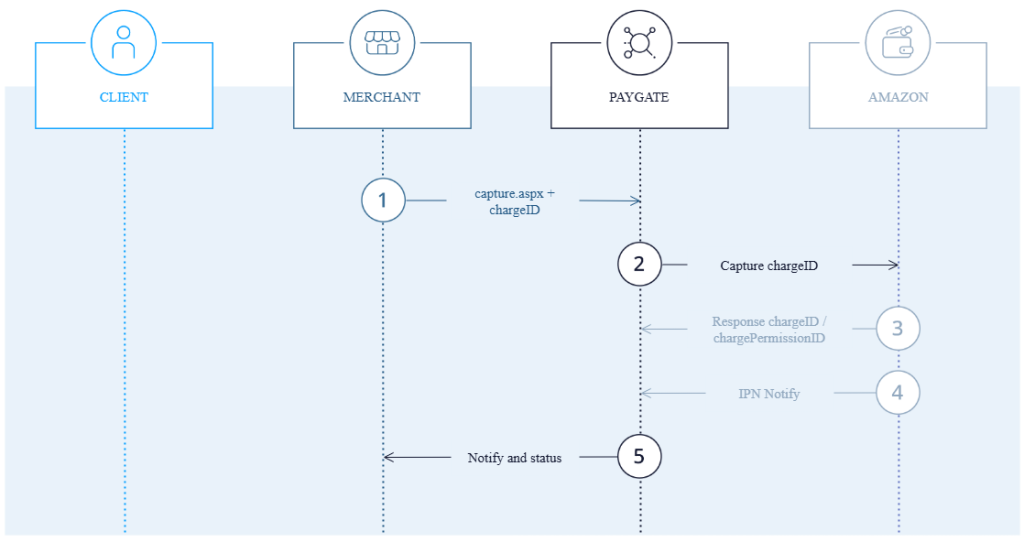
Notice: Multiple partial captures are currently not supported.
In order to capture an authorized payment with Amazon Pay, please use the following URL
https://www.computop-paygate.com/capture.aspx
The following tables describe the transfer parameters and return values which are exchanged via the socket connection. The server-to-server communication process is described in the manual Programming basics.
Notice: For security reasons, 1cs Online Payment System rejects all payment requests with formatting errors. Therefore, please use the correct data type for each parameter.
The following table describes the encrypted payment request parameters:
| Key | Format | CND | Description |
| MerchantID | ans..30 | M | MerchantID, assigned by First Cash Solution. Additionally this parameter has to be passed in plain language too. |
| PayID | an32 | M | ID assigned by 1cs OPS for the payment, e.g. for referencing in batch files as well as for capture or credit request. |
| TransID | ans..64 | M | TransactionID provided by you which should be unique for each payment |
| Amount | n..10 | M | Amount in the smallest currency unit (e.g. EUR Cent). Please contact the 1cs Support, if you want to capture amounts <100 (smallest currency unit). |
| Currency | a3 | M | Currency, three digits DIN / ISO 4217, e.g. EUR, USD, GBP. Please find an overview here: A1 Currency table |
| refnr | ans..30 | O | Merchant’s unique reference number |
| MAC | an64 | M | Hash Message Authentication Code (HMAC) with SHA-256 algorithm. Details can be found here: HMAC Authentication (Request) HMAC Authentication (Notify) |
| ReqId | ans..32 | O | To avoid double payments or actions (e.g. by ETM), enter an alphanumeric value which identifies your transaction and may be assigned only once. If the transaction or action is submitted again with the same ReqID, 1cs Online Bezahlsystem will not carry out the payment or new action, but will just return the status of the original transaction or action. Please note that the 1cs Online Bezahlsystem must have a finalized transaction status for the first initial action (authentication/authorisation). This does not apply to 3-D Secure authentications that are terminated by a timeout. The 3-D Secure Timeout status does not count as a completed status in which the ReqID functionality on 1cs Online Bezahlsystem does not take effect. Submissions with identical ReqID for an open status will be processed regularly. Notice: Please note that a ReqID is only valid for 12 month, then it gets deleted at the 1cs Online Bezahlsystem. |
| ChDesc | ans..16 | O | Text printed on the customer’s credit card bill alongside the payee |
| OrderDesc | ans..127 | O | Use this parameter for the simulation mode. During live mode this parameter has no effects. |
| AmazonpaySimulationCode | ans.. | O | A parameter used to simulate specific payment scenarios or behaviors during testing. For complete list of allowed simulation code, refer Amazonpay documentation. |
The following table describes the result parameters with which the 1cs Online Payment System responds to your system
Notice: pls. be prepared to receive additional parameters at any time and do not check the order of parameters
Notice: the key (e.g. mid, RefNr) should not be checked case-sensitive
| Key | Format | CND | Description |
| mid | ans..30 | M | MerchantID, assigned by First Cash Solution |
| PayID | an32 | M | ID assigned by 1cs Online Bezahlsystem for the payment, e.g. for referencing in batch files as well as for capture or credit request. |
| XID | an32 | M | ID for all single transactions (authorisation, capture, credit note) for one payment assigned by 1cs OPS |
| TransID | ans..64 | M | TransactionID provided by you which should be unique for each payment |
| refnr | ans..30 | O | Merchant’s unique reference number |
| Status | a..50 | M | OK (URLSuccess) or FAILED (URLFailure) |
| Description | ans..1024 | M | Further details in the event that payment is rejected. Please do not use the Description but the Code parameter for the transaction status analysis! |
| Code | an8 | M | Error code according to 1cs Online Payment System Response Codes (A4 Error codes) |
| CodeExt | ans..10 | O | Error code from Amazon, if transferred |
| ErrorText | as..1024 | O | Error description from Amazon, if transferred |
| chargeid | ans..256 | M | Amazon Pay Charge ID |
| AmazonStatus | a..20 | M | Order status at Amazon. Following values are possible: „Opened“, „Completed, „Canceled“. Details see Amazon API Reference Guide. |
| chargepermissionid | ans..256 | M | Amazon Pay Permission ID |
| Amount | n..10 | M | Amount in the smallest currency unit (e.g. EUR Cent). Please contact the 1cs Support, if you want to capture amounts <100 (smallest currency unit). |
| Currency | a3 | M | Currency, three digits DIN / ISO 4217, e.g. EUR, USD, GBP. Please find an overview here: A1 Currency table |
| AmountAuth | n..10 | M | Total amount which is reserved at Amazon |
| AmountCap | n..10 | M | Total amount which is already successfully captured at Amazon |
| AmountCred | n..10 | M | Total amount which is already successfully credited at Amazon |
After a capture you get a notify to your specified URLNotify with following parameters:
| Key | Format | CND | Description |
| mid | ans..30 | M | MerchantID, assigned by First Cash Solution |
| PayID | an32 | M | ID assigned by 1cs Online Bezahlsystem for the payment, e.g. for referencing in batch files as well as for capture or credit request. |
| XID | an32 | M | ID for all single transactions (authorisation, capture, credit note) for one payment assigned by 1cs Online Bezahlsystem |
| TransID | ans..64 | M | TransactionID provided by you which should be unique for each payment |
| refnr | ans..30 | O | Merchant’s unique reference number |
| Status | a..50 | M | OK (URLSuccess) or FAILED (URLFailure) |
| Description | ans..1024 | M | Further details in the event that payment is rejected. Please do not use the Description but the Code parameter for the transaction status analysis! |
| Code | an8 | M | Error code according to 1cs Online Payment System Response Codes (A4 Error codes) |
| CodeExt | ans..10 | O | Error code from Amazon, if transferred |
| ErrorText | as..1024 | O | Error description from Amazon, if transferred |
| chargeid | ans..256 | M | Amazon Pay Charge ID |
| AmazonStatus | a..20 | M | Order status at Amazon. Following values are possible: „Opened“, „Completed, „Canceled“. Details see Amazon API Reference Guide. |
| chargepermissionid | ans..256 | M | Amazon Pay Permission ID |
| OrderID | ans..19 | M | Unique ID for the order issued by Amazon. Corresponds to the OrderReferenceID. |
| AmazonRefID | ans..27 | M | Unique ID for the transaction issued by Amazon |
| Amount | n..10 | M | Amount in the smallest currency unit (e.g. EUR Cent). Please contact the 1cs Support, if you want to capture amounts <100 (smallest currency unit). |
| Currency | a3 | M | Currency, three digits DIN / ISO 4217, e.g. EUR, USD, GBP. Please find an overview here: A1 Currency table |
| AmountAuth | n..10 | M | Total amount which is reserved at Amazon |
| AmountCap | n..10 | M | Total amount which is already successfully captured at Amazon |
| AmountCred | n..10 | M | Total amount which is already successfully credited at Amazon |
| NotificationType | a..25 | M | Describes the type of notification. Fixed value: <CaptureNotification> |
Credit a payment
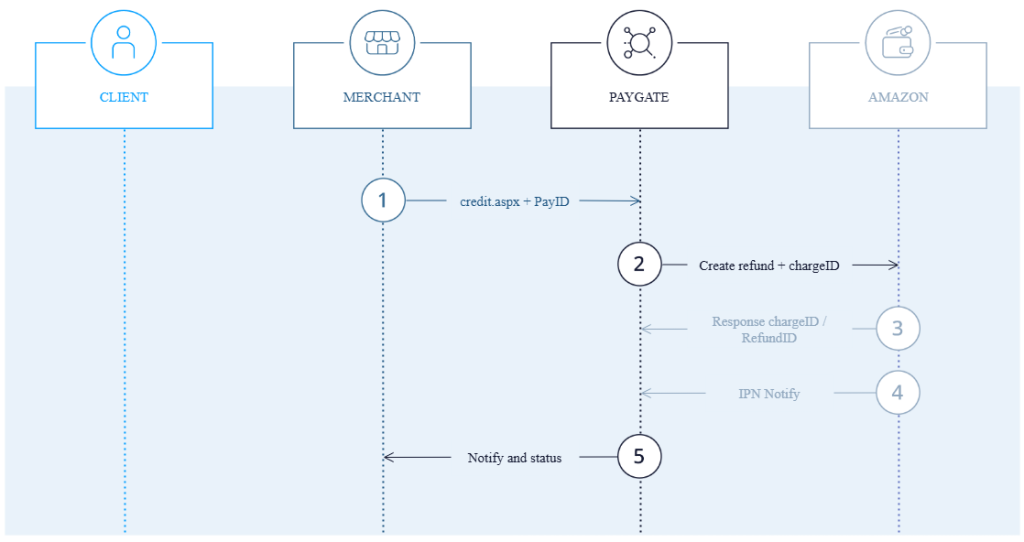
In order to credit a captured payment with Amazon Pay, please use the following URL:
https://www.computop-paygate.com/credit.aspx
The following tables describe the transfer parameters and return values which are exchanged via the socket connection. The server-to-server communication process is described in the manual Programming basics.
Notice: For security reasons, 1cs Online Payment System rejects all payment requests with formatting errors. Therefore, please use the correct data type for each parameter.
The following table describes the encrypted payment request parameters:
| Key | Format | CND | Description |
| MerchantID | ans..30 | M | MerchantID, assigned by First Cash Solution. Additionally this parameter has to be passed in plain language too. |
| PayID | an32 | M | ID assigned by 1cs OPS for the payment, e.g. for referencing in batch files as well as for capture or credit request. |
| TransID | ans..64 | M | TransactionID provided by you which should be unique for each payment |
| Amount | n..10 | M | Amount in the smallest currency unit (e.g. EUR Cent). Please contact the 1cs Support, if you want to capture amounts <100 (smallest currency unit). |
| Currency | a3 | M | Currency, three digits DIN / ISO 4217, e.g. EUR, USD, GBP. Please find an overview here: A1 Currency table |
| refnr | ans..30 | O | Merchant’s unique reference number |
| MAC | an64 | M | Hash Message Authentication Code (HMAC) with SHA-256 algorithm. Details can be found here: HMAC Authentication (Request) HMAC Authentication (Notify) |
| ReqId | ans..32 | O | To avoid double payments or actions (e.g. by ETM), enter an alphanumeric value which identifies your transaction and may be assigned only once. If the transaction or action is submitted again with the same ReqID, 1cs OPS will not carry out the payment or new action, but will just return the status of the original transaction or action. Please note that the 1cs OPS must have a finalized transaction status for the first initial action (authentication/authorisation). This does not apply to 3-D Secure authentications that are terminated by a timeout. The 3-D Secure Timeout status does not count as a completed status in which the ReqID functionality on 1cs OPS does not take effect. Submissions with identical ReqID for an open status will be processed regularly. Notice: Please note that a ReqID is only valid for 12 month, then it gets deleted at the 1cs OPS. |
| OrderDesc | ans..127 | O | Description of purchased goods, unit prices etc. for credit |
| AmazonpaySimulationCode | ans.. | O | A parameter used to simulate specific payment scenarios or behaviors during testing. For complete list of allowed simulation code, refer Amazonpay Dokumentation. |
The following table describes the result parameters with which the 1cs Online Payment System responds to your system
Notice: pls. be prepared to receive additional parameters at any time and do not check the order of parameters
Notice: the key (e.g. mid, RefNr) should not be checked case-sensitive
| Key | Format | CND | Description |
| mid | ans..30 | M | MerchantID, assigned by First Cash Solution |
| PayID | an32 | M | ID assigned by 1cs OPS for the payment, e.g. for referencing in batch files as well as for capture or credit request. |
| XID | an32 | M | ID for all single transactions (authorisation, capture, credit note) for one payment assigned by 1cs OPS |
| TransID | ans..64 | M | TransactionID provided by you which should be unique for each payment |
| refnr | ans..30 | O | Merchant’s unique reference number |
| Status | a..50 | M | OK (URLSuccess) or FAILED (URLFailure) |
| Description | ans..1024 | M | Further details in the event that payment is rejected. Please do not use the Description but the Code parameter for the transaction status analysis! |
| Code | an8 | M | Error code according to 1cs OPS Response Codes (A4 Error codes) |
| CodeExt | ans..10 | O | Error code from Amazon, if transferred |
| ErrorText | as..1024 | O | Error description from Amazon, if transferred |
| AmazonStatus | a..20 | M | Order status at Amazon. Following values are possible: „Opened“, „Completed, „Canceled“. Details see Amazon API Reference Guide. |
| chargeid | ans..256 | M | Amazon Pay Charge ID |
| refundid | ans..256 | M | Amazon Pay Refund ID |
| Amount | n..10 | M | Amount in the smallest currency unit (e.g. EUR Cent). Please contact the 1cs Support, if you want to capture amounts <100 (smallest currency unit). |
| Currency | a3 | M | Currency, three digits DIN / ISO 4217, e.g. EUR, USD, GBP. Please find an overview here: A1 Currency table |
| AmountAuth | n..10 | M | Total amount which is reserved at Amazon |
| AmountCap | n..10 | M | Total amount which is already successfully captured at Amazon |
| AmountCred | n..10 | M | Total amount which is already successfully credited at Amazon |
After a credit you get a notify to your specified URLNotify with following parameters:
| Key | Format | CND | Description |
| mid | ans..30 | M | MerchantID, assigned by First Cash Solution |
| PayID | an32 | M | ID assigned by 1cs OPS for the payment, e.g. for referencing in batch files as well as for capture or credit request.quest. |
| XID | an32 | M | ID for all single transactions (authorisation, capture, credit note) for one payment assigned by 1cs OPS |
| TransID | ans..64 | M | TransactionID provided by you which should be unique for each payment |
| refnr | ans..30 | O | Merchant’s unique reference number |
| Status | a..50 | M | OK (URLSuccess) or FAILED (URLFailure) |
| Description | ans..1024 | M | Further details in the event that payment is rejected. Please do not use the Description but the Code parameter for the transaction status analysis! |
| Code | an8 | M | Error code according to 1cs OPS Response Codes (A4 Error codes) |
| CodeExt | ans..10 | O | Error code from Amazon, if transferred |
| ErrorText | as..1024 | O | Error description from Amazon, if transferred |
| AmazonStatus | a..20 | M | Order status at Amazon. Following values are possible: „Opened“, „Completed, „Canceled“. Details see Amazon API Reference Guide. |
| chargeid | ans..256 | M | Amazon Pay Charge ID |
| refundid | ans..256 | M | Amazon Pay Refund ID |
| Amount | n..10 | M | Amount in the smallest currency unit (e.g. EUR Cent). Please contact the 1cs Support, if you want to capture amounts <100 (smallest currency unit). |
| Currency | a3 | M | Currency, three digits DIN / ISO 4217, e.g. EUR, USD, GBP. Please find an overview here: A1 Currency table |
| AmountAuth | n..10 | M | Total amount which is reserved at Amazon |
| AmountCap | n..10 | M | Total amount which is already successfully captured at Amazon |
| AmountCred | n..10 | M | Total amount which is already successfully credited at Amazon |
| NotificationType | a..25 | M | Describes the type of notification. Fixed value: <CreditNotification> |
Reverse an order
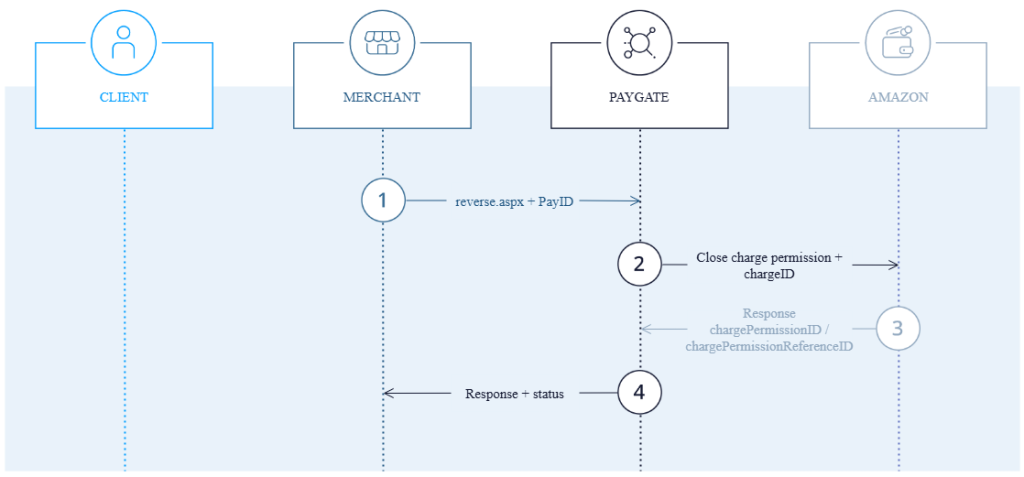
In order to reverse a complete order with Amazon Pay with the function „CancelOrderReference“, please use the following URL:
https://www.computop-paygate.com/reverse.aspx
The following tables describe the transfer parameters and return values which are exchanged via the socket connection. The server-to-server communication process is described in the manual Programming basics.
Notice: For security reasons, 1cs Online Payment System rejects all payment requests with formatting errors. Therefore, please use the correct data type for each parameter.
The following table describes the encrypted payment request parameters:
| Key | Format | CND | Description |
| MerchantID | ans..30 | M | MerchantID, assigned by First Cash Solution. Additionally this parameter has to be passed in plain language too.. |
| PayID | an32 | M | ID assigned by 1cs OPS for the payment, e.g. for referencing in batch files as well as for capture or credit request. |
| MAC | an64 | M | Hash Message Authentication Code (HMAC) with SHA-256 algorithm. Details can be found here: HMAC Authentication (Request) HMAC Authentication (Notify) |
| Reason | a..1024 | O | Reason for reversal |
| ReqId | ans..32 | O | To avoid double payments or actions (e.g. by ETM), enter an alphanumeric value which identifies your transaction and may be assigned only once. If the transaction or action is submitted again with the same ReqID, 1cs OPS will not carry out the payment or new action, but will just return the status of the original transaction or action. Please note that the 1cs OPS must have a finalized transaction status for the first initial action (authentication/authorisation). This does not apply to 3-D Secure authentications that are terminated by a timeout. The 3-D Secure Timeout status does not count as a completed status in which the ReqID functionality on 1cs OPS does not take effect. Submissions with identical ReqID for an open status will be processed regularly. Notice: Please note that a ReqID is only valid for 12 month, then it gets deleted at the 1cs OPS. |
The following table describes the result parameters with which the 1cs Online Payment System responds to your system
Notice: pls. be prepared to receive additional parameters at any time and do not check the order of parameters
Notice: the key (e.g. mid, RefNr) should not be checked case-sensitive
| Key | Format | CND | Description |
| mid | ans..30 | M | MerchantID, assigned by First Cash Solution |
| PayID | an32 | M | ID assigned by 1cs OPS for the payment, e.g. for referencing in batch files as well as for capture or credit request. |
| XID | an32 | M | ID for all single transactions (authorisation, capture, credit note) for one payment assigned by 1cs OPS |
| TransID | ans..64 | M | TransactionID provided by you which should be unique for each payment |
| refnr | ans..30 | O | Merchant’s unique reference number |
| Status | a..50 | M | OK (URLSuccess) or FAILED (URLFailure) |
| Description | ans..1024 | M | Further details in the event that payment is rejected. Please do not use the Description but the Code parameter for the transaction status analysis! |
| Code | an8 | M | Error code according to 1cs OPS Response Codes (A4 Error codes) |
| CodeExt | ans..10 | O | Error code from Amazon, if transferred |
| ErrorText | as..1024 | O | Error description from Amazon, if it was transferred |
| AmazonStatus | a..20 | M | Order status at Amazon. Following values are possible: „Opened“, „Completed, „Canceled“. Details see Amazon API Reference Guide. |
| chargeid | ans..256 | M | Amazon Pay Charge ID |
| chargepermissionid | ans..256 | M | Amazon Pay Permission ID |
| Amount | n..10 | M | Amount in the smallest currency unit (e.g. EUR Cent). Please contact the 1cs Support, if you want to capture amounts <100 (smallest currency unit). |
| Currency | a3 | M | Currency, three digits DIN / ISO 4217, e.g. EUR, USD, GBP. Please find an overview here: A1 Currency table |
| AmountAuth | n..10 | M | Total amount which is reserved at Amazon |
| AmountCap | n..10 | M | Total amount which is already successfully captured at Amazon |
| AmountCred | n..10 | M | Total amount which is already successfully credited at Amazon |
Setup recurring payments
In order to set up a recurring payment with Amazon Pay, submit the below data in addition to the standard request described in Step 6 above.
Initial Payment
| Key | Format | CND | Description |
| RTF | ans1 | M | I = Initial payment in the series |
| cycle | an..7 | M | Cycle. Supported values: ‚Year‘, ‚Month‘, ‚Week‘, ‚Day‘, ‚Variable‘ |
| Value | n..4 | M | Number of frequency units per billing cycle. For example, to specify a weekly cycle set unit to Week and value to 1. You must set value to 0 if you’re using variable unit. Year: 1-3 Month: 1-36 Week: 1-57 Day: 1-1095 |
| InstallmentAmount | n..10 | C | Transaction amount – choose zero if is not a fixed amount |
| Currency | a3 | C | Transaction currency code in ISO 4217 format, for example: EUR |
Recurring Payment
| Key | Format | CND | Description |
| RTF | ans1 | M | R = Recurring |
| Amount | n..10 | M | Aktualisierter Betrag iUpdated Amount in the smallest currency unit (e.g. EUR Cent). Please contact the 1cs Support, if you want to capture amounts <100 (smallest currency unit). |
| Currency | a3 | M | Currency, three digits DIN / ISO 4217, e.g. EUR, USD, GBP. Please find an overview here: A1 Currency table |
| CountryCode | an2 | M | Country code of used marketplace. Options EU, US and JP. |
| ChargepermissionId | ans..256 | M | Charge Permission ID that you received in the response to the initial payment in the series |